Best Employee Monitoring Software
Discover how your Employees use their time without Micromanaging them.
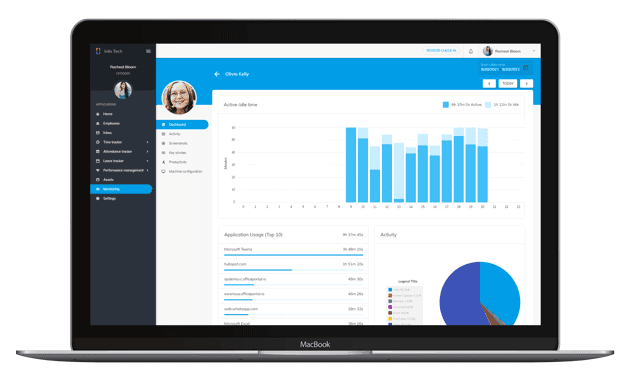
Understand how your team works
Affordable, Intuitive, Comprehensive, Employee Monitoring Software.
LIVE STATUS
Get live data of employee's first, last seen, active screen, background screens, active and idle time.
PRODUCTIVITY
Track productive and non-productive hours by individually classifying apps and websites.
SCREENSHOTS
Record non-intrusive and encrypted periodic screenshots to determine the workload and distractions.
KEYSTROKES
Document encrypted keystrokes to provide insight into employee activities without compromising privacy.
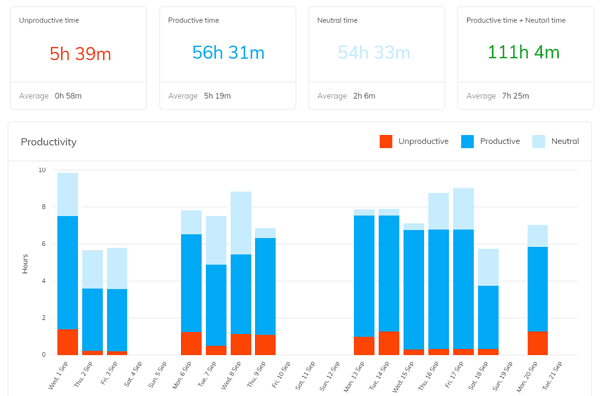
Boost Employee Productivity with Classified, Observed and Refined App Usage
With in-depth real-time data insights into employee productivity and work patterns, you'll have the tools you need to reach your goals and meet deadlines. The simple and detailed data analysis provides a clear understanding of department performance metrics. And with fully customizable settings, you can tailor the monitoring to your specific needs and measure employees' performance accurately.
- Classify Productive Applications
Classify productive and unproductive websites and applications to calibrate employees' and team productivity.
- Observe Employee Productivity
Analyse how your team uses websites and apps to understand their work pattern with real-time productivity data.
- Refine Productive Applications
Redefine the productive and unproductive apps and websites to enhance their productivity.
- Improve Employee Productivity
Frequent optimisation of apps and website classification will improve your team's and employees' productivity.
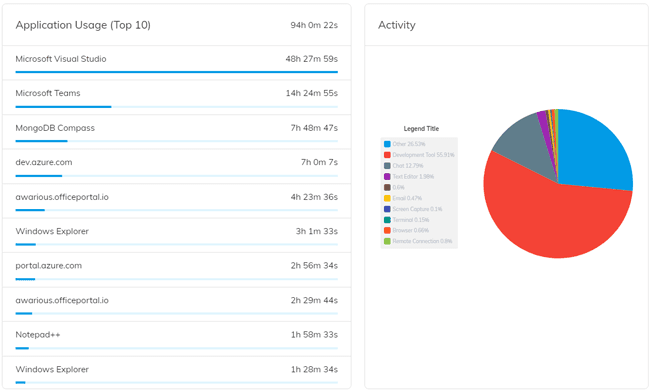
Employee Performance Tracking
OfficePortal Employee Monitoring Software helps track employee productivity, including websites accessed and applications used. The software has unique, highly configurable personalized settings to categorize productive and non-productive hours of usage. Employee Computer Monitoring Software helps determine the active and idle time of the work from home employees, freelancers, contractors, and remote-based consultants.
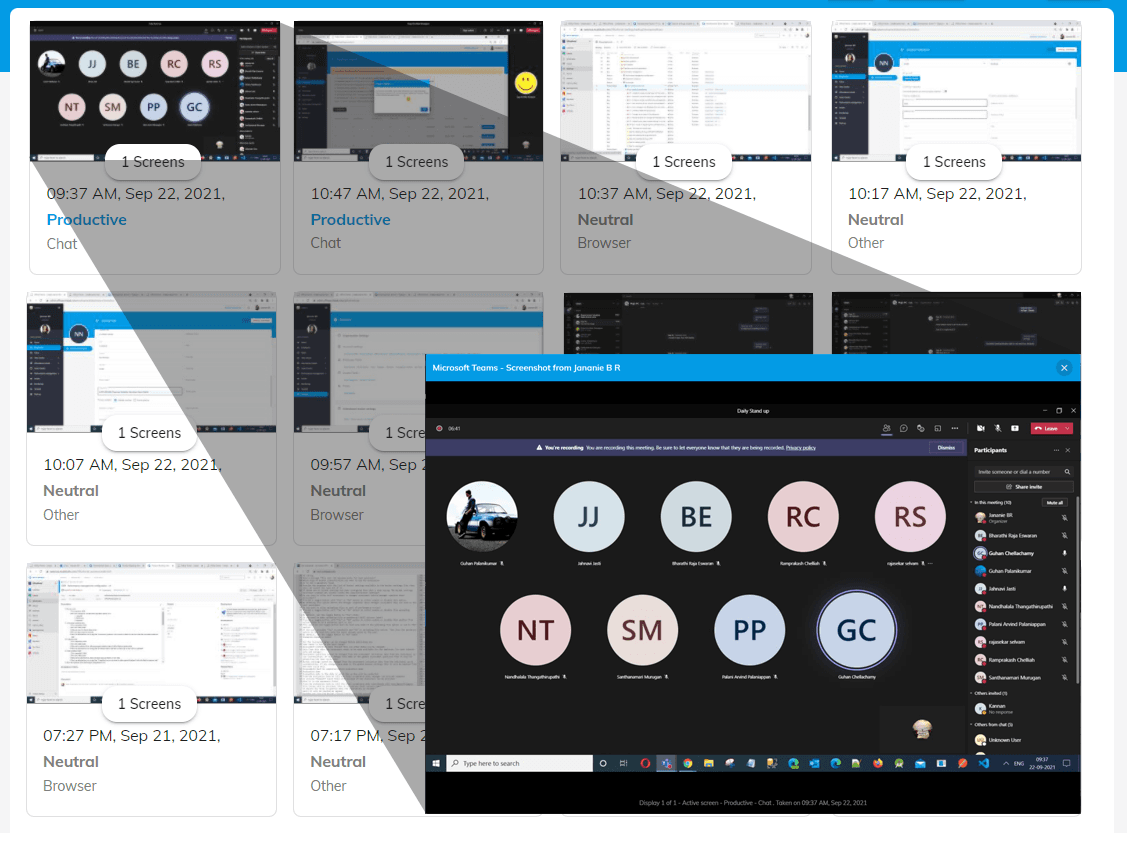
Enhance Employee Monitoring with Encrypted Screenshots
Experience ultimate security and privacy with OfficePortal Employee Monitoring Software. Our solution operates in stealth mode and is fully encrypted to ensure non-intrusive monitoring. Customize screenshot intervals to fit your needs.
You have the option to disable screenshot capturing for individual employees or specific groups or for a specific application. The software captures keystrokes and periodic screenshots, transferring the information to you for analysis. Keep an eye on remote workers and contractors with ease, using our encrypted screenshot feature to monitor their productivity over time.
Keystrokes To Analyse Security Breaches
Optional Keystroke Recording
Employees' keystrokes can be recorded for added insight into their activities. This feature is optional and can be disabled for specific employees, teams, or applications.
Encrypted Keystroke Storage
Rest assured that your employees' keystrokes are securely stored, with encryption to protect sensitive information. Passwords are not captured for added security.
Improved Remote Team Visibility
Keep an eye on remote employees and contractors with ease, using keystroke recording to monitor their productivity over time. This feature provides added visibility into work-from-home activities, helping to identify potential security breaches.
Get Started in 3 Simple Steps
It takes just a few minutes to set up your employee monitoring.
Setup Free Account
It is easy to create a free account. No credit card is required.
Book a Demo
Get a personalised demo; our client service offices can give you a complete insight into OfficePortal.
Personalise OfficePortal
Personalise your OfficePortal with a few simple clicks and start using it.
Ready to get started? Start your free trial.
We offer 7 days free trial on our elite version.
Benefits of Employee Monitoring Software
Increased Productivity
Employee monitoring software can help increase productivity by providing real-time visibility into employee activity. This information can help managers identify areas where employees may be wasting time or not working efficiently. By addressing these issues, managers can increase employee productivity and improve overall performance.
Improved Workplace Accountability
Employee monitoring software can also help improve accountability in the workplace. By tracking employee activity, managers can ensure that employees are following company policies and meeting expectations. This can help to create a more structured and organized workplace, where employees are held accountable for their actions.
Better Time Management
Employee monitoring software can also help improve time management by providing detailed information on how employees are spending their time. This information can help managers to identify areas where employees are wasting time and make adjustments to their schedules or workloads.
Reduced Costs
Finally, employee monitoring software can help reduce costs by reducing the need for manual monitoring and by improving productivity. By automating the monitoring process, organizations can reduce the amount of time and resources needed to monitor employee activity. Additionally, by improving productivity and reducing the time employees spend on non-essential tasks, organizations can save money in the long run.
Best Practices for Implementing Employee Monitoring Software
Develop a Clear Policy
Before implementing employee monitoring software, it is important to develop a clear policy outlining the purpose, scope, and limitations of the software. The policy should also detail how the software will be used, who will have access to the data collected, and how data privacy will be protected. This policy should be communicated to all employees, along with any relevant legal or ethical considerations.
Provide Employee Training
Employee training is an important step in ensuring the success of an employee monitoring software implementation. Employees should be trained on how the software works, its benefits, and the expectations for use. This training can help employees understand the purpose of the software and how it will impact their work.
Ensure Data Privacy
Productivity monitoring software collects a large amount of data, which can include sensitive information. It is important to ensure that this data is stored securely and that access to it is limited to authorized personnel. Employers must also comply with data protection regulations, such as GDPR in the European Union.
Regularly Review and Evaluate
Finally, it is important to regularly review and evaluate the use of employee monitoring software. This can help to identify areas where the software is providing value and where improvements can be made. It can also help to ensure that the software is being used in compliance with company policies and relevant regulations. Regular review and evaluation can help to ensure that employee monitoring software continues to provide value to the organization.
Have a question?
Start Monitoring Your Team Today
Join 5,100+ companies already using OfficePortal to boost productivity.