Lively Collaboration Software
Promotes healthy and professional communication among employees using OfficePortal's Intranet Social Media
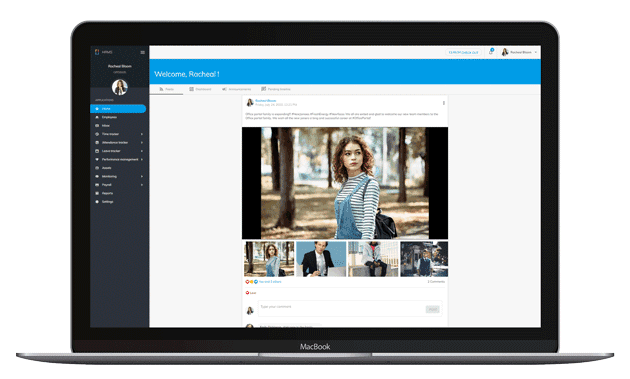
Exclusive collaborative tool within the organization
A system, like Social Media, to share happy moments, awards and announcements.
FEEDS
Share text, photo albums, videos and articles among your team members.
ANNOUNCEMENT
Organisations can make announcements to all employees here instead of sending emails.
PRIVACY
Posted feeds and announcements can be visible only to specific employees, departments, etc., as you prefer.
MODERATION
Organisations can moderate feeds, comments and replies before posting to rule out unnecessary content.

Want to share something among your team or across the organisation?
Employee Feeds are the Intranet social media for your office, similar to 'What Employees Feel.' You can use it to share work-related or casual content. The fun part is that you can comment on and react to posts, making it more engaging and interactive. You can also mention your colleagues using @mentions in your posts and comments. By following your co-workers on OfficePortal, you can see what they post on their feeds. This tool makes it easy to connect and mingle with your colleagues within the company..
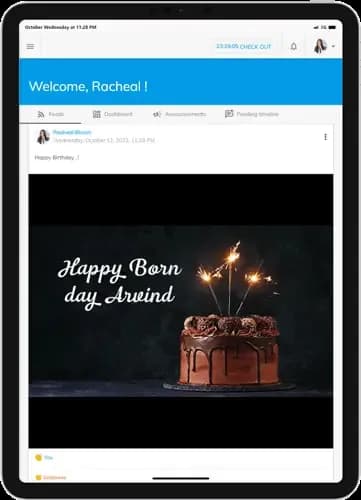
Stay connected from anywhere
Well. With our Portal, it is like working from connected homes. All the employees stay engaged within the teams with posts, pictures and technical articles. Employees share birthday wishes, photos of celebrations and other exciting events. With our feeds system, working from home feels closer to the teams than working in the office with the proximity of workspaces.
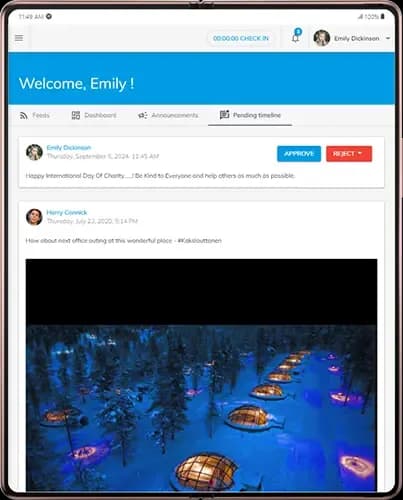
Do you want to eliminate unwanted content hovering around?
The collaboration tool is internal to the office, no doubt. However, the Portal gives great flexibility to control the posts floating inside the office. The tool has the facility to Disable comments / Enable comments and to restrict which departments can post etc. Employees can control every post with Visibility Settings as to who can view the content.
- Feed Settings
The framework to disable comments or set up a rule to moderate feeds, comments and replies at the organisation level.
- Post Settings
Used to set guidelines to moderate or disable comments for an individual post, even if it is allowed in organisation-level settings.
- Moderators
The one with moderator role will have access to moderate the comments and replies before getting published in the feeds section.
- Pending Timeline
This section will allow the moderators to act upon approving or rejecting feeds, comments and replies for the feeds.
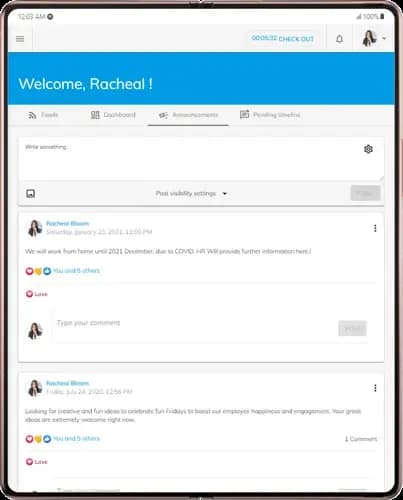
Announcements
The organization-level announcements no longer need to be sent via email. This section in our Portal is perfect for company-wide updates, such as policy changes, 'Job Well-Done' notes, new product or project announcements, and more. Employees can comment on and react to these announcements, which improves communication and collaboration within the organization.
How It Works
Setup Free Account
It is easy to create a free account. No credit card is required.
Book a Demo
Get a personalised demo; our client service offices can give you a complete insight into OfficePortal.
Personalise OfficePortal
Personalise your OfficePortal with a few simple clicks and start using it.
Ready to get started? Start your free trial .
We offer 7 days free trial on our elite version.