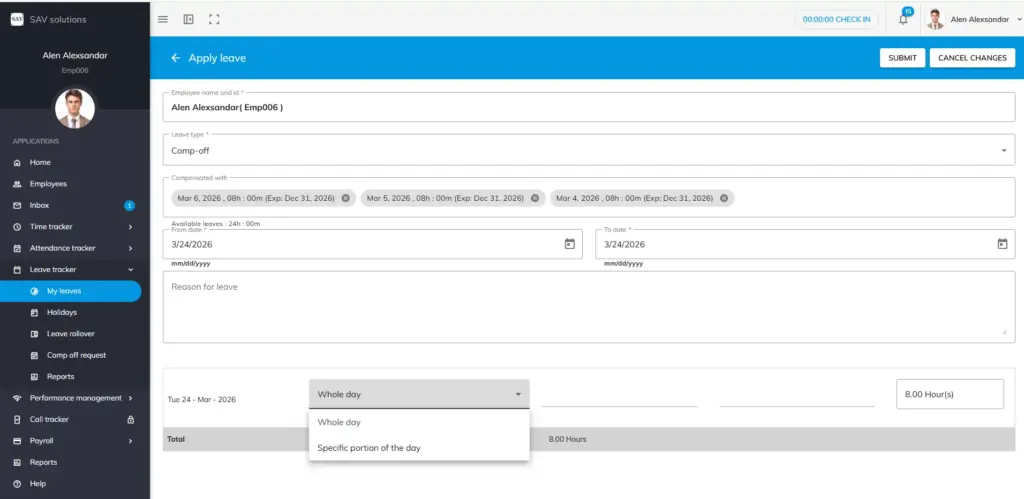
To Apply for Comp-Off Leave
Step 1: Navigate to the My Leaves section and check your available comp-off hours.
Step 2: Click the Apply Leave button and select the leave type as Comp-Off.
Alternatively, you can directly apply by clicking on the comp-off leave legend, in which case the leave type will be auto-selected.
Step 3: In the Compensated With section, you will see the worked dates along with the exact comp-off hours approved by your reporting manager. Select the dates you want to compensate with and remove any dates you do not wish to use.
Step 4: Enter the Start Date and End Date for your comp-off leave.
Step 5: Choose whether you are applying for a Whole Day or a Portion of the Day. If it is for a portion of the day, specify the Start Time and End Time.
Step 6: The total comp-off hours being requested will be displayed automatically. Provide a reason for the leave application if required.
Step 7: Click the Submit button to send your comp-off leave request. Your request will appear as pending approval.
Please Note
Once your manager approves the comp-off leave, the corresponding hours will be deducted from your comp-off balance. For example, if you had 12 hours of comp-off balance and applied for 2 hours, your updated balance will reflect 10 hours.