Individual Cycle Customisation allows you to modify review cycle settings for a specific cycle without changing your global Performance Management configuration in OfficePortal.
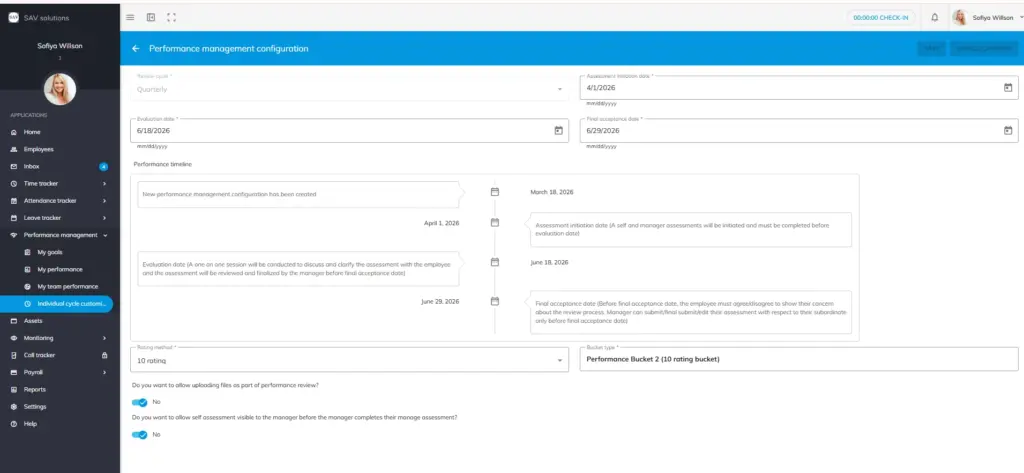
Accessing Individual Cycle Customisation
In OfficePortal, go to Performance Management → Individual Cycle Customisation.
What You Can Customise
- Review dates – Set alternative Assessment Initiation, Evaluation, and Final Acceptance dates for the selected cycle
- Rating method – Change the rating method for that cycle
- Bucket type – Modify the bucket type for that cycle
- File upload permission – Allow or restrict employees from uploading files during the performance review
- Self-assessment visibility – Control whether the self-assessment is visible to the manager before they complete their assessment
Important Note
Customisations made in Individual Cycle Customisation apply only to the nearest upcoming review cycle in OfficePortal. Once that cycle ends, the system reverts to the global Performance Management configuration. You must return to Individual Cycle Customisation to apply changes to each subsequent cycle.
Example: If your OfficePortal global configuration runs quarterly (Jan 1 – Mar 30), customising the Q1 cycle affects only Q1. The Q2 cycle (April 1 onwards) follows the original global settings unless updated